
In short
Both Copilot reports tell you who used Copilot and how often, but neither tells you whether your rollout messages actually reached the teams that lag behind. Learn what each report counts, why their numbers differ, and which one to quote to leadership.
Key takeaways
- The admin report counts a user as active only after a user-initiated Copilot feature, such as a submitted prompt, not after opening the pane.
- No paid Viva Insights or Copilot licence is needed to view the Copilot Dashboard; 50 licences unlock benchmarks and group-level data.
- The usage report covers 7 to 180 days and lands within 72 hours; the Dashboard shows a 28-day window, so the two numbers rarely match.
- Neither Copilot report shows whether your rollout news, emails or Viva Engage posts reached the department that lags behind.
Which Copilot report answers which question?
Microsoft ships Copilot reporting in more than one place, and each report answers a different question. Copilot Analytics spans six areas: the readiness and adoption report in the Microsoft 365 admin center, the Microsoft Copilot Dashboard in the Viva Insights web app, the Agent Dashboard, the Consumption Dashboard, Copilot Analytics reports, and Advanced Reporting[1]. As the person who assigns licences and answers for adoption, you will work mainly with the first two. The other four matter once analysts join the conversation.
| Report | Who it serves | The question it answers |
|---|---|---|
| Readiness and adoption report (Microsoft 365 admin center) | IT and Digital Workplace admins | Which Copilot licences are assigned, who is active, and who should receive a licence next |
| Microsoft Copilot Dashboard (Viva Insights) | Leaders, managers and their delegates | How ready the organisation is, how adoption develops, and what impact Copilot has |
| Consumption Dashboard | Analysts, managers and Microsoft 365 Global Administrators | How Copilot Credits and GitHub AI Credits are consumed across agents, services and users |
| Advanced Reporting | Analysts | Granular usage and impact questions, with more than 100 Copilot metrics and custom filters |
Microsoft's own 'which tool should I use when' guidance draws the same line. The readiness and adoption report is the starting point that informs your licence deployment and rollout strategy and helps you identify which users to assign licences to. The Copilot Dashboard takes over once you have deployed Copilot: it helps you understand usage and evaluate impact across the organisation, including Copilot actions taken across each Microsoft 365 app, estimated financial savings and learning resources[1].
Keep that split in mind before anyone asks you for numbers. If the question is whether the licence investment is being used, the admin center report answers it. If the question is whether Copilot is changing how people work, the Dashboard answers it. Neither report, as you will see below, answers why one department has not opened Copilot at all.
What does the admin center usage report count?
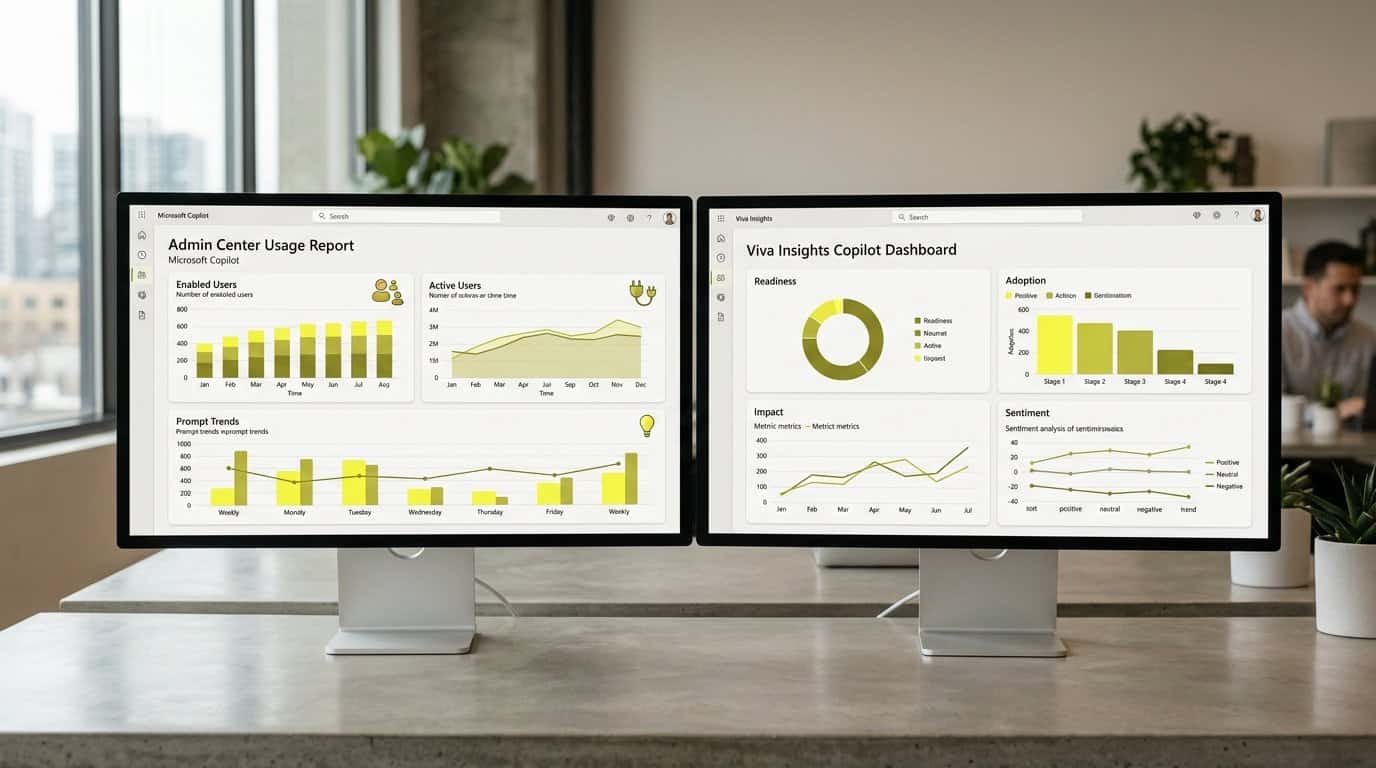
You will find the report in the Microsoft 365 admin center under Reports, then Usage, then Microsoft Copilot. It is built for the questions you face while deploying licences: how many people have Copilot, how many actually use it, and where the gap sits[2]. These are the numbers you can quote in a licence review:
- Enabled Users: the total number of unique users in your organisation with Microsoft Copilot licences over the selected timeframe.
- Active Users: enabled users who tried a user-initiated Microsoft Copilot feature in one or more Microsoft 365 apps over that timeframe.
- Active users rate: active users divided by enabled users.
- Total prompts submitted: the total number of prompts users sent to Microsoft Copilot Chat during the selected timeframe.
- Average prompts submitted per user: the mean number of prompts each active user sent to Copilot Chat.
What counts as active
Active means the user tried a user-initiated Copilot feature, such as submitting a prompt. Opening the Copilot pane is not activity. The Adoption by app section breaks enabled and active users down per app, and the per-user table adds a last activity date in UTC for each app, so you can see whether a licence has been idle for weeks or was active yesterday[2].
You can filter the report over the last 7, 30, 90 or 180 days, and data for a given day typically becomes available within 72 hours of that day ending. When you need to sort, filter and search across all users, export the report to an Excel.csv file[2].
What does the Copilot Dashboard add?
The Copilot Dashboard lives in the Viva Insights web app and speaks to leaders, managers and their delegates rather than to admins. Where the usage report counts activity, the Dashboard frames Copilot around four categories of metrics: readiness, adoption, impact and sentiment[3].
- Readiness: how prepared your organisation is to deploy AI, including licences assigned and active Copilot users over the last 28 days.
- Adoption: adoption trends by group over the previous six months, aggregated weekly, plus usage levels from novice to power users.
- Impact: Copilot actions taken across each Microsoft 365 app, Copilot assisted hours, satisfaction rate, estimated financial savings and learning resources.
- Sentiment: survey-based sentiment data, which reflects the period of your selected survey duration rather than the 28-day window.
Usage levels and privacy thresholds
The Dashboard classifies users by how frequently and consistently they use Copilot over a rolling 12-week window. Power users average 15 or more Copilot actions per week and have used Copilot in at least 9 of the past 12 weeks. Habitual users average between 1 and 14 actions per week with the same consistency, while novice users took at least one action in the past 12 weeks but did not use Copilot in at least 9 of those weeks[3].
Two limits shape what you will see. Data on the readiness, adoption and impact pages covers the previous 28 days, with up to a six-day delay from the current date. And to protect individual privacy, metrics are not shown for groups smaller than the minimum group size your organisation sets[3]. The Dashboard sits in Viva Insights, which answers questions about work patterns and wellbeing, a different job from communication analytics.
Why do the two reports show different numbers?
Sooner or later someone will quote the admin report in a meeting and someone else the Dashboard, and the numbers will not match. That is expected, not an error. The two reports describe the same adoption, but the populations, time windows and refresh delays differ, so the same week can produce two different figures.
| Dimension | Admin center usage report | Copilot Dashboard |
|---|---|---|
| Time window | Last 7, 30, 90 or 180 days | Previous 28 days; sentiment follows your survey period |
| Data delay | Typically within 72 hours of the day ending | Up to six days from the current date |
| Population | Users with Microsoft Copilot licences | Employees with an assigned Copilot licence, plus Copilot Chat usage by users without a licence where the tenant has at least one |
| Best used for | Licence planning and adoption monitoring | Impact narratives for leadership |
The population difference has a structural cause: all employees with Microsoft Copilot licences are automatically assigned a Viva Insights service plan, which makes them part of the measured population for the dashboards and for Advanced Reporting[4].
There is a third layer, though. When a communication colleague asks why the intranet and email numbers never match either Copilot report, that is a different measurement altogether: readership of internal communications, not Copilot usage. We come back to it below.
Why is one team still not using Copilot?
Now the harder question. The usage report shows you that a department is inactive. It does not tell you why. A team can lag for reasons that have nothing to do with motivation: the rollout news never reached them, the licence email drowned in a crowded inbox, the Viva Engage announcement scrolled past unread. Native Microsoft analytics counts views, but it does not show whether a message landed in the specific parts of the organisation it was meant for.
- It tells you who is inactive, and since when, down to the per-user last activity date.
- It does not tell you whether the rollout announcement reached that team's inbox, intranet page or Viva Engage feed.
- It does not tell you whether managers cascaded the message in their team meetings.
- It does not distinguish 'never heard about it' from 'heard about it and chose not to engage'.
Check reach before you retrain
Adoption and communication are two different measurements, and neither Copilot report covers the second one. Before you book training for the lagging team, check whether your rollout communications actually reached them: whether the announcement landed in that team's inbox, intranet page or Viva Engage feed, and whether managers cascaded it.
Here is the measurement neither Copilot report gives you: did the rollout messages reach the department that is not using Copilot? To answer it, you need Copilot adoption by group on one side and the reach of your rollout communications by department on the other, in one view. Copilot accelerates the drafting of those rollout messages, but it does not track employee readership or engagement once they are published[5].
This is where we at Tryane built Communication Insights, our all-in-one cross-channel analytics platform. It connects your email newsletters, your SharePoint intranet, Viva Connections and Viva Engage into one central dashboard, so you can read cross-channel reach and engagement segmented by department, country, language and role. Reach here means the number of unique people who consumed a piece of content, which is different from views, a count that can include repeats.
- Whether the rollout news on your SharePoint intranet reached the lagging department, and how intranet adoption varies by site.
- Whether the managers who were meant to cascade the message actually opened the rollout email.
- Whether the Viva Engage announcement generated reach and reactions in the communities that lag behind.
- What your campaign reports in Viva Amplify show, and where their limits sit.
Put the two pictures side by side and the conversation with the lagging team changes. Instead of asking why they ignore Copilot, you can see whether the message ever arrived, on which channel, and who it reached by role. If reach was the problem, you fix the distribution. If reach was fine and adoption still lags, you know the enablement investment is justified. Either way, you stop guessing and make a data-driven decision about where your rollout needs help next.
Want to see which teams your Copilot rollout messages actually reached? Book a call with our team. In 30 minutes we will walk through your current measurement setup and show what cross-channel reach by department looks like on your actual Microsoft 365 tenant.
Frequently asked questions
What is the difference between the Microsoft Copilot usage report and the Copilot Dashboard?
The usage report lives in the Microsoft 365 admin center and is built for admins: it tracks enabled users, active users and prompts submitted to Copilot Chat to inform licence deployment and rollout strategy. The Copilot Dashboard lives in Viva Insights and is built for leaders and managers: it covers readiness, adoption, impact and sentiment, including Copilot actions across Microsoft 365 apps and learning resources.
Do I need a Copilot licence to view the Copilot Dashboard?
No. Microsoft states that neither a paid Viva Insights licence nor a Microsoft Copilot licence is required to view the Dashboard; any customer with a Microsoft 365 or Office 365 subscription for business or enterprise and an active Exchange Online account can view it. Tenants with at least 50 Copilot licences or at least 50 Viva Insights licences additionally get benchmarks, intelligent summaries and group-level data.
What counts as an active Copilot user in the admin report?
An active user is an enabled user who tried a user-initiated Microsoft Copilot feature in one or more Microsoft 365 apps over the selected timeframe. Simply opening the Copilot pane does not count; a submitted prompt or an equivalent user-initiated feature does.
Why do the two Copilot reports show different numbers?
The two reports describe the same adoption, but the populations, time windows and refresh delays differ. The admin report can span 7 to 180 days and typically lands within 72 hours, while the Dashboard shows a 28-day window and can run days behind, so the same week can produce two different figures. Quote the admin report for licence planning and the Dashboard for impact narratives to leadership.
How far back can I view Copilot usage data?
In the Microsoft 365 admin center you can view the Microsoft Copilot usage report over the last 7, 30, 90 or 180 days, and data for a given day is typically available within 72 hours of the end of that day in UTC. The Copilot Dashboard in Viva Insights works with a shorter 28-day window.
Does the Copilot Dashboard show whether employees received our rollout communications?
No. Both Copilot reports measure usage of Copilot, not the reach of your internal communications. A department can show low adoption because the rollout news, emails and Viva Engage posts never reached it, and no usage metric will reveal that. To answer that question you need cross-channel internal communication analytics that show reach by department.
What is Copilot Analytics?
Copilot Analytics is Microsoft's umbrella for six areas: the readiness and adoption report in the Microsoft 365 admin center, the Copilot Dashboard in Viva Insights, the Agent Dashboard, the Consumption Dashboard, Copilot Analytics reports, and Advanced Reporting through the Viva Insights web app and pre-configured Power BI dashboards. Advanced Reporting lets you select from more than 100 Copilot metrics with customizable filters.
Sources
Further reading
• SharePoint Usage Reports: Where to Find Them and What Comms Still Miss
• Measuring Microsoft Copilot effect on internal communications
• Microsoft Copilot in internal communications: measurement implications
• Can Copilot be used for internal communication?
If you want to see what cross-channel reporting looks like against your real data, Tryane runs a 15-minute walkthrough with no slides. Book a slot with Jérémy.