In short
When an organisational crisis strikes, standard monthly metrics are useless. Learn how to track speed of reach, channel performance, and frontline penetration in real time, and why establishing a pre-crisis baseline is your single greatest asset.
Key takeaways
- Establish an engagement baseline before crises hit to easily identify deviations and anomalies during active emergencies.
- Track the speed of reach within the first 15 to 60 minutes to ensure critical safety updates are read immediately.
- According to research, of communicators prioritise impact measurement, which becomes critical during an organisational crisis
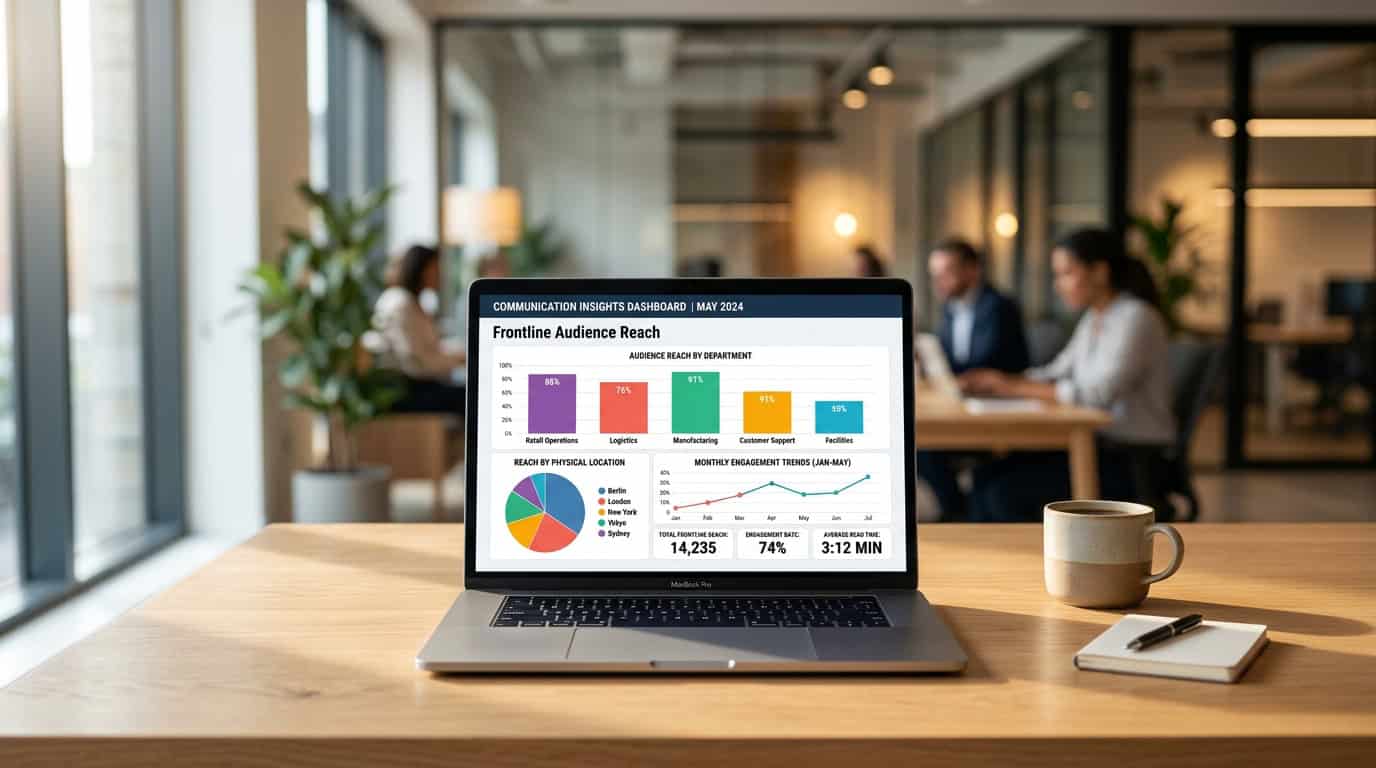
- Segment metrics by role or location using HR files to verify that frontline and deskless workers receive life-saving updates.
Establish a baseline: why pre-crisis data is your safety net
When a corporate crisis hits, typical internal communication vanity metrics fail. In moments of high stress, you need immediate, cross-channel visibility into speed of reach, frontline penetration, and overall employee sentiment. However, you cannot measure the severity of a crisis without first establishing what a normal day looks like. Many teams operate in the dark: research shows that only 56% of internal communications professionals track website or intranet analytics, while 19% do not measure their internal communications at all[1]. Without a pre-crisis baseline, you risk overreacting to minor spikes in engagement or, worse, missing critical communication blind spots entirely.
Identify standard engagement across your digital channels
Understanding your standard day-to-day engagement is crucial to making data-driven decisions during an emergency. We at Tryane help corporate communications leaders establish these essential baselines by consolidating their metrics into an all-in-one platform. To build a robust baseline, you must look beyond isolated dashboards and track standard activity on your SharePoint intranet, Viva Engage communities, and internal email newsletters simultaneously. This is especially true given that SharePoint native analytics often cap your data history, making it difficult to analyse long-term patterns. By maintaining a continuous, unrestricted history of your data, you can isolate standard seasonal dips from genuine crisis-induced drop-offs.
| Channel | Standard Day-to-Day Metrics (Baseline) | Crisis Indicators (What to Monitor) |
|---|---|---|
| SharePoint Intranet | Average daily page views, active readers, and average read-time (such as 2 minutes per article). | Immediate speed of reach, total unique readers within the first hour of a critical post, and reading-depth changes. |
| Viva Engage | Standard post views, reaction rates, active communities, and average sentiment score. | Spikes in active contributors, rapid shifts in sentiment distribution, and the emergence of viral threads. |
| Internal Newsletters | Average open rates, standard link click-through rates, and read-duration benchmarks. | Urgent read-rates, immediate link click-throughs, and frontline employee access times. |
By contrasting standard metrics against real-time data, you can quickly evaluate whether your urgent messages are reaching the right people. Our cross-channel analytics platform, Communication Insights, brings all of these channels together into a single view, allowing you to monitor essential internal communication KPIs without jumping between different administrative interfaces. This holistic view enables you to link your digital workplace data to concrete strategic outcomes: when a crisis occurs, you can adapt your strategy, improve your impact, and make data-driven decisions that protect your organisation’s alignment.
Ultimately, flying blind is the worst position to be in when the stakes are highest. If you do not know your baseline engagement, an 80% open rate on an urgent bulletin might look like a success, when it actually represents a communications bottleneck for your frontline workers. Setting up your measurement infrastructure today ensures you have the historical data and templates ready to guide your leadership team through any future storm.
Track the speed of reach: measuring awareness when minutes count
When a crisis strikes, the timeline of corporate communication shrinks from weeks and months down to minutes. In these high-stakes moments, standard weekly or monthly reporting cycles are completely useless. Whether you are dealing with a severe cyber incident, an extreme weather event, or an operational shutdown, the first hour (often called the golden hour) is critical for protecting employee trust and safety[2]. Crisis communication leaders must deliver an initial response within this tight window to verify facts and control the narrative[3]. You cannot afford to wait for days to understand if your workforce actually received the warning.
To manage urgency effectively, you need immediate, cross-channel visibility instead of relying on slow, fragmented data. If you are stuck using basic SharePoint native analytics, you are flying blind during the most critical moments of the incident. That is why specialised tools like our Analytics for SharePoint are built to provide immediate clarity when it matters most. We at Tryane believe that tracking the speed of reach requires real-time monitoring across all your key communication channels at once. Our platform, Communication Insights, provides an all-in-one cross-channel view that aggregates and visualises critical engagement metrics immediately. Because our software is GDPR compliant by design and deploys in a couple of hours with SSO via Azure AD or Microsoft Entra ID, you can establish this critical dashboard quickly without dragging your IT department through long procurement cycles.
Monitor key channel metrics in the first 15 to 60 minutes
Rather than focusing on simple page views or historic trends, you must track short-term interaction signals that indicate immediate receipt. This means analysing rapid engagement trends in real time. We recommend looking at specific metrics across each critical channel to measure how quickly information is dispersing throughout your digital workplace.
- Rapid email opens: Track the percentage of recipients who open your urgent HTML newsletters or direct email alerts within 15, 30, and 60 minutes of sending.
- Immediate SharePoint page views: Monitor the rapid traffic spike on your emergency announcement pages using specialised intranet insights.
- Microsoft Teams alert acknowledgements: Evaluate the speed at which pinned posts, mentions, or direct alerts are seen and acknowledged by active users.
- Viva Engage response rates: Track immediate replies and reactions to urgent leadership posts in core enterprise communities.
Identify missing workforce segments in real time
Measuring aggregate views only tells half the story. During an emergency, knowing who has not seen the message is far more important than knowing who has. For instance, if an operational issue affects a specific manufacturing facility or regional office, you must be able to segment your reach data on the fly. By mapping your real-time communication metrics against Active Directory or HR file imports, you can instantly see which specific offices, departments, or frontline groups are still in the dark.
This granular level of detail allows you to adjust your channels on the spot. If your dashboard shows that frontline workers have a 10 percent read rate on a SharePoint update after 30 minutes, but a 70 percent view rate on Microsoft Teams, you can immediately shift your priority to Teams to broadcast the remaining instructions. This data-driven approach turns measurement from a retrospective post-mortem into an active, life-saving crisis tool.
Setting up these capabilities requires a reliable framework before an incident even occurs. This is why establishing modern internal communication KPIs is so vital for your overall crisis preparedness strategy. With a unified reporting environment, you can stop guessing and start responding with absolute precision.
Map your channel mix: reaching employees where they actually are
When an urgent situation unfolds, relying on a single channel is a significant vulnerability. If you send a critical update solely via email, you risk it being buried under hundreds of daily messages. If you post it only on the intranet, frontline or on-the-go workers may miss it entirely. To protect your organisation and keep teams aligned, you must evaluate your reach across Microsoft Teams, SharePoint, Viva Engage, and internal newsletters simultaneously. This requires moving beyond siloed measurements and adopting a cross-channel single view. We at Tryane design our solutions to break down these data silos, enabling you to make data-driven decisions based on where your employees actually focus their attention.
By looking at cross-channel analytics, you can view metrics in one centralised place to reduce effort and identify exactly where messages resonate.
Identify the channels that drive the fastest action
During a crisis, typical vanity metrics like page views fail. Instead, you must measure the speed of reach, which is the time it takes for a message to be seen or acknowledged after publication. For instance, according to Gallagher’s State of the Sector research, many internal communications teams struggle to monitor real-time reach because they are constrained by native platform reporting limits[4]. When every second counts, comparing engagement across channels allows you to identify which medium drives the fastest action. You can see whether a high-priority post on Viva Engage sparks immediate peer-to-peer reassurance, or if a push alert in Microsoft Teams secures faster operational confirmation.
Establishing these vital internal communication KPIs before an emergency occurs provides the baseline you need to compare real-time crisis reach against normal employee behaviour.
| Channel | Crisis Use Case | Urgency Level | Primary Metric to Monitor |
|---|---|---|---|
| Microsoft Teams | Instant tactical notifications and local team coordination | Critical or High | Active view count within 15 minutes |
| SharePoint Intranet | Single source of truth for detailed crisis FAQs and policies | Medium or High | Unique reader counts by department |
| Viva Engage | Open dialogue, leadership reassurance, and crowd-sourced Q&As | Medium | Active participants and sentiment trends |
| Email Newsletters | Direct executive updates and comprehensive summaries | High | Open rates and unique click-to-read rates |
Understand which audiences read your critical updates
Reaching deskless or frontline workers is often the hardest part of crisis communication. With our all-in-one platform, Communication Insights, we help you track exactly which segments of your workforce have received your message. You can leverage audience segmentation via Active Directory or a simple HR file import to break down reach by department, region, or role. Because our software deploys in a couple of hours using secure single sign-on (SSO) via Azure AD or Entra ID, you can quickly stand up a centralised dashboard when you need it most. Our platform is SOC 2 Type 2 certified and GDPR compliant by design, meaning your internal communications data remains secure and EU-hosted by default, with US data residency available on demand.
Relying on basic native reporting makes it difficult to measure real-time sentiment or long-term trends during a crisis. Organisations that encounter Viva Engage native analytics limits quickly realise that a lack of audience segmentation and restricted history prevents them from identifying whether key groups are actually engaging. Because Communication Insights maintains an unlimited history of your communication data, far exceeding standard six-month limits, you can easily compare active crisis engagement against a reliable baseline. This allows you to measure how well your team managed the risk, adapting your strategy to improve your impact during future events.
Bridge the frontline gap: ensuring updates reach deskless workers
Are employees actually reading the news posts you publish when an operational emergency unfolds? Deskless workers account for 80% of the global workforce, and they are typically the hardest to reach because they do not spend their days sitting in front of a computer screen[5]. When a crisis hits, relying on aggregate, company-wide averages is highly risky. You cannot make data-driven decisions based on vague metrics that bundle your deskbound corporate offices with your frontline teams. To keep everyone safe and aligned, you must verify that your urgent safety alerts actually penetrate your deskless environments instead of getting lost in corporate noise.
Segment your communication data by role and location
To make your internal communication more efficient during these critical windows, you must segment your data. By connecting our platform to your Active Directory or uploading a secure HR file import, you can map your workforce by department, location, role, or shift. We designed our cross-channel platform, Communication Insights, to pull this demographic data automatically. This level of segmentation allows you to isolate your deskless workers from your deskbound office staff. You can see precisely who has opened the communication and who is still in the dark, enabling you to adapt your strategy and ensure no frontline team is left exposed.
Because crisis data often includes sensitive employee demographics, IT leaders require absolute security. We at Tryane ensure your employee directories remain fully protected: our software is SOC 2 Type 2 certified, GDPR compliant by design, and hosted in the EU by default with US data residency options available on demand. In addition, the platform deploys in a couple of hours using secure single sign-on (SSO) via Azure AD or Entra ID, plus straightforward channel connections. This lets you get up and running rapidly, providing your team with an immediate cross-channel view of SharePoint, Viva Engage, Microsoft Teams, and email newsletters in one unified dashboard.
Compare crisis metrics against a reliable baseline
When you look at native toolkits, you will find they fall short when you need them most. For example, the built-in tracking tools in Microsoft 365 do not offer demographic segmentation, and they cap your historical data at six months. In contrast, our platform provides unlimited historical data so you can compare crisis engagement against a stable pre-crisis baseline. If you are struggling with these native limits, reading about the constraints of SharePoint native analytics can help you understand why a dedicated analytics layer is essential for your crisis readiness. You can also read our guide on how to measure employee engagement across your entire digital workplace to set up these baselines.
- Map precise demographics: Leverage Azure AD, Entra ID, or HR file imports to segment your deskless workers by factory, region, or manufacturing shift.
- Track real-time penetration: Monitor how quickly safety alerts reach active frontline channels during the first crucial hours of an incident.
- Avoid native data gaps: Maintain unlimited analytics history so you can accurately compare active crisis engagement against a stable pre-crisis baseline.
- Monitor social feedback: Track employee sentiment and comments on Viva Engage to gauge understanding and clarify confusing instructions.
- Target critical blind spots: Identify which specific locations show low read rates so you can direct local managers to deliver verbal updates.
Ultimately, measuring frontline reach is about translating raw data into active protection. By moving past basic page views and tracking real-time audience segment behaviour, you can improve your impact and secure your operational environments. When you see exactly where communication gaps exist, you can stop wasting time guessing whether your messages arrived. Instead, you can take immediate, targeted action to protect your workforce, proving that your internal communications strategy is a vital asset when the stakes are highest.
Monitor sentiment: tracking real-time reactions and preventing panic
Measuring reach only proves that employees saw a message, not how they processed it. When a crisis hits, typical vanity metrics like simple page views fail to provide the deep insights that internal communication leads need. You require immediate, cross-channel visibility to make sure messages do not lead to confusion or panic. To understand the true state of your digital workplace during an emergency, you must look beyond who opened the update and analyse how people are actually responding.
Understand reactions and comments on Viva Engage
During a crisis, enterprise social networks become the primary hub for employee discussion and, occasionally, speculation. Tracking comment spikes, reactions, and conversational threads on platforms like Viva Engage is critical to detect confusion, answer urgent questions, and stop rumors before they spread. However, relying on basic tools can restrict your view. If you use native reporting, you will run into severe limitations, such as fixed reporting periods and a lack of audience segmentation Viva Engage analytics limits. At Tryane, we designed Analytics for Viva Engage to overcome these barriers, helping you monitor ongoing conversations, map employee sentiment, and quickly identify which business units require immediate support.
- Comment volume spikes: An unexpected surge in comment volume on a crisis-related post indicates high employee concern or confusion.
- Reaction ratios: Analysing the ratio of supportive reactions to negative or questioning comments helps you gauge the emotional temperature.
- Unanswered questions: Monitoring the volume of unanswered questions in threads is crucial to ensure leadership stays responsive.
- Segmented sentiment: Breaking down the conversation by department or location using Active Directory data to identify pockets of high anxiety.
By monitoring these real-time reactions, you can adapt your strategy immediately instead of waiting for a post-crisis review. If sentiment indicators show rising anxiety or confusion in a specific department, you can coordinate with local managers to address their concerns directly. Combining these qualitative insights with a pre-crisis baseline allows you to make data-driven decisions that restore trust and guide your workforce safely through the crisis[6].
Ditch manual spreadsheets: building executive-ready reports under pressure
When a crisis hits, corporate leadership needs immediate, reliable data to understand how quickly and effectively critical messages are reaching employees. There is no time to manually compile statistics across multiple spreadsheets, and typical vanity metrics will quickly fail under pressure. According to industry studies, 19% of internal communications teams do not measure their performance at all[1]. During an active crisis, this lack of measurement is not just a gap, it is a liability. To keep your executive team aligned, you need structured executive reporting that provides single-view visibility without requiring hours of manual work.
The hidden pitfalls of custom Power BI builds
Many communication leads look to Microsoft 365 environments to construct their own Power BI builds as a custom solution. However, relying on these builds during a high-stakes crisis can expose critical data gaps. The underlying Microsoft Graph reporting API is not always reliable, which can lead to occasional odd KPI values or unexpected days of missing data. Additionally, internal communications teams running Power BI over SharePoint frequently find that the KPI values displayed in Power BI differ from those in the SharePoint native analytics dashboards for the exact same dataset. While a Power BI integration is on our roadmap, we believe that relying on custom builds during an active crisis introduces unnecessary technical risk when you need real-time clarity.
| Reporting Feature | Custom Power BI Builds | Tryane Dashboards |
|---|---|---|
| Deployment speed | Weeks of engineering and API setup | A couple of hours via SSO and Entra ID |
| Data accuracy | Occasional odd KPI values and missing days of data | Reliable single view verified across M365 channels |
| Historical baseline | Subject to standard native limits | Unlimited history for precise pre-crisis benchmarks |
| Security compliance | Requires custom organisational security review | SOC 2 Type 2 certified and GDPR compliant by design |
Deploying an analytics system during or right before an emergency must be fast and secure. We designed Tryane to launch in a couple of hours using secure single sign-on (SSO) via Azure AD or Entra ID, combined with simple channel connections. Your data remains fully protected: Tryane is SOC 2 Type 2 certified and GDPR compliant by design. By default, your data is EU-hosted, though we can provide data residency in the United States on demand. There are no heavy server setups, allowing you to establish a stable communication baseline and begin tracking active metrics immediately.
With our flagship solutions, including Communication Insights and Analytics for SharePoint, you gain an all-in-one cross-channel view. This gives you a single view across SharePoint, Viva Engage, Microsoft Teams, and your internal newsletters. We also provide robust audience segmentation using your Active Directory or an HR file import, allowing you to track how frontline workers or specific divisions receive your messages. By avoiding manual spreadsheets and leveraging our executive-ready templates, we at Tryane help you deliver the reliable, real-time insights your leadership demands when stakes are highest.
Frequently asked questions
Why is a pre-crisis engagement baseline necessary?
Without a baseline, you cannot tell if a sudden spike or drop in engagement is an anomaly or standard behaviour. Establishing normal performance across SharePoint, Microsoft Teams, and email newsletters before a crisis allows you to immediately see when and where employee attention shifts during an emergency.
Which metrics matter most in the first hour of a corporate crisis?
The most critical metrics in the first hour are speed of reach and read rates. Rather than waiting days for open rates to settle, you must track real-time page views on your SharePoint intranet and immediate delivery confirmations on Microsoft Teams to verify that urgent safety or operational messages have been seen.
How do you measure internal communication reach among frontline workers?
Frontline or deskless workers are often disconnected from corporate emails. To measure their reach, segment your audience metrics by department, location, or role using Active Directory or HR imports. This allows you to verify if deskless teams are actively reading safety updates via mobile-friendly channels.
Why can Microsoft Graph and Power BI show inconsistent communications data?
The Microsoft Graph reporting API can occasionally experience latency or missing data, leading to odd KPI values. Consequently, internal communications teams running Power BI over SharePoint frequently see different metrics than those displayed on native dashboards, making dedicated cross-channel tools more reliable.
What is the best way to monitor employee sentiment during an active crisis?
You can monitor sentiment by tracking real-time engagement patterns on enterprise social platforms like Viva Engage. Look for spikes in comments, reactions, and shares on critical posts, and use automated dashboards to analyse the general tone of employee discussions to spot panic or misinformation early.
Sources
• un.org
• ajg.com
Further reading
• Measuring cross-channel internal communications
• Audience segmentation for internal communications
• The five internal communication KPIs that show your IC is working
• Measuring frontline worker communications
Tryane runs a 15-minute working session with Heads of Internal Communication, walking through your current measurement setup and showing where the segmentation gaps sit on your own Microsoft 365 tenant. Book a slot with Jérémy.