

Quick answer: Internal communicators use AI tools for four jobs: drafting and rewriting news, emails and campaign posts (Copilot in Outlook, SharePoint and Viva Amplify, or ChatGPT), answering employee questions (SharePoint agents and chatbots built in Copilot Studio), finding information (Copilot Search) and summarising meetings and news. The catch: when an assistant answers in place of the intranet, page views stop reflecting reach, so reach has to be measured by audience and across channels.
Introduction
In today’s ever-evolving professional landscape, effective internal communication is paramount for a company’s success. Faced with information overload and numerous communication channels, AI tools offer solutions to enhance employee interaction.
The best AI tools for improving internal communication and intranet: Content Generation
As communication professionals, you understand the challenge of creating engaging content for your employees. AI can streamline this process and save you valuable time.
- Copilot: Microsoft’s Copilot is an AI-powered assistant that swiftly crafts impactful articles and messages. Built on large language models, it generates text suggestions based on user input, ensuring both efficiency and quality. For more information on how Copilot can aid your internal communication, check out our article Can Copilot be used for internal communication?
- ContentBot: ContentBot is an AI-driven tool that tailors content for your company’s intranet and social media platforms. It adapts to your needs and preferences, even allowing customization of style and tone to align with your company’s brand image.
- Murf IA: Murf IA converts any text into synthetic voiceovers, perfect for internal communication podcasts or announcements. It offers various natural-sounding voices and customization options for speed, intonation, and accent, catering to specific departmental or regional needs.

The best AI tools for improving internal communication and intranet: Virtual Assistance
Chatbots and virtual assistants have become indispensable for addressing employee queries and guiding intranet usage. Here are some standout tools that will transform your support service.
- Microsoft Power Virtual Agents: Microsoft Power Virtual Agents empowers you to create customized chatbots tailored to your company’s unique requirements. User-friendly and efficient, this platform automates responses to frequently asked questions, saving valuable time. Integrated into the intranet, Power Virtual Agents enhance user experience by swiftly providing necessary information without human intervention. Its flexibility enables customization according to employee preferences, ensuring a more satisfactory user experience.
- IBM Watson Assistant: IBM Watson Assistant is a sophisticated AI tool that delivers an exceptional user experience for employees. With its advanced natural language understanding, it engages in seamless dialogue with colleagues. Integrated into the intranet, Watson Assistant provides instant 24/7 support, answering common questions and providing information on internal policies without human intervention. It can also be tailored to suit your company’s specific needs and automate repetitive tasks, freeing up time for more value-added activities.
- Google Dialogflow: Google Dialogflow revolutionizes internal communication by enabling the creation of conversational agents capable of handling complex interactions with users. Leveraging advanced natural language processing technology, Dialogflow intuitively understands human language, facilitating smooth and natural interactions for employees. It excels in managing various interactions, from technical queries to internal policy information or even evaluation interviews. Dialogflow also offers extensive customization options, allowing conversational agents to be adapted to your company’s specific needs by integrating diverse relevant information sources.

The best AI tools for improving internal communication and intranet: Meeting Enhancement
Meetings are essential to professional life, but their effectiveness can be compromised by inefficient data and interaction management. Here are some AI tools that can simplify data collection and meeting enhancement.
- Fireflies: Fireflies simplifies note-taking by accurately recording and transcribing meeting content using AI. Leveraging natural language processing (NLP) technology, it offers features such as automatic summarization, commenting, and the ability to share audio or video clips. It also provides valuable insights such as measuring each participant’s speaking time and identifying relevant keywords. Fireflies seamlessly integrates with conference applications and professional tools, offering a free basic version with unlimited meeting transcription.
- Beekast: Beekast is a web platform that streamlines the creation, facilitation, and tracking of meetings and training sessions. With easy-to-deploy activities, it enables the integration of PowerPoint presentations, PDFs, videos, and interactive activities to encourage collaboration and idea generation. Whether in-person or remote, Beekast brings teams together to make decisions, track actions, and keep a record of all exchanges.
- Teams: In addition to its video conferencing features, Teams offers live transcription and automatic translation options to facilitate multilingual exchanges. These features enhance understanding and inclusivity during meetings, thereby strengthening internal communication efficiency.

AI-powered intranet: what it means in practice
In Microsoft 365, an AI-powered intranet is rarely a new portal. It is usually the SharePoint intranet you already run, with AI added where employees look for information.
AI search and answers. Microsoft Copilot Search takes questions in everyday language and can show a concise AI-generated answer above the results[1]. Every SharePoint site also has a ready-made agent that answers questions about the site’s content, limited to what the person is allowed to see[2].
Copilot in SharePoint and Viva Connections. Editors can rewrite text on SharePoint pages and news posts with Copilot, adjusting tone and length[3]. In Viva Connections, Copilot can summarise the top ten news articles in an employee’s feed, currently in the Teams desktop app[4].
Chatbots in front of the intranet. Power Virtual Agents, listed above, is now part of Microsoft Copilot Studio[5], whose agents can be deployed to SharePoint sites[6], Teams and Microsoft 365 Copilot[7].
What changes for measuring reach. SharePoint counts a page view when someone views the page[8]. An employee who reads the answer in a Copilot or agent pane may never open that page, so views can fall while the message still lands. Reach has to be read by audience and across channels, not from page views alone. Our analysis of what happens to intranet numbers when a chatbot answers first shows which metrics break and what to track instead.
Conclusion
This provides an overview of the top AI tools to energize and streamline internal communication within your company. By integrating these technologies into your daily operations, you can enhance efficiency, relevance, and collaboration, ultimately contributing to improved engagement and productivity within your organization. Feel free to explore these tools and tailor them to suit your specific needs. For further insights, you can delve into our article: Will Chat GPT replace your Company’s Internal Communication?
Frequently asked questions
What is an AI intranet?
An AI intranet is an intranet where employees can ask a question and get an answer, instead of only browsing menus and pages. In Microsoft 365 that usually means the existing SharePoint intranet plus AI search, site agents that answer from site content, Copilot summaries of news, and sometimes a custom chatbot built in Copilot Studio. The content still lives on the intranet; AI changes the route people take to reach it.
What are the best AI tools for internal communications?
Choose by job rather than by brand. For drafting, a Microsoft 365 organisation gets most from Copilot because it works where communicators already write: Copilot in Outlook drafts an email from a prompt[9], and Viva Amplify publications use the same Copilot editor as SharePoint[10]. For employee questions, start with SharePoint agents or a Copilot Studio agent. For meetings, Copilot in Teams summarises key discussion points[11]. Then decide how you will check that AI-assisted messages reached the audience they were written for.
Can Copilot write internal communications?
It can draft and rewrite them; it should not publish them unreviewed. Copilot in Outlook drafts an email from your prompt and lets you change its length and tone[9]. On SharePoint pages and news posts, Copilot rewrites text in the Text web part, for example making it more concise or more professional, for users with a Copilot licence[3]. The communicator still owns the facts, the fit with the audience and the sign-off, especially on sensitive announcements.
How do you measure AI-generated internal content?
The same way as any other communication: reach against the intended audience, broken down by segment and across every channel the item went out on, then depth and the one action it asked for. Who or what wrote the draft does not change those measures. What AI changes is volume, so compare reach per item before and after adoption rather than totals. Microsoft’s Copilot usage report shows enabled users, active users and prompts submitted[11]: useful for adoption, silent on whether the content reached anyone. Our guide to measuring AI-generated content in internal communications covers the method and the ethical questions.
Do AI intranet features in Microsoft 365 need an extra licence?
Mostly, yes. Copilot Search requires an eligible Copilot licence[1]. Agents in SharePoint need a Copilot licence or pay-as-you-go billing enabled for SharePoint agents[2]. The Viva Connections news summary is rolling out to users with a Copilot licence[4], and a Copilot Studio agent deployed to SharePoint consumes Copilot Studio capacity[6]. Confirm current terms with Microsoft before you budget.
Sources
• Microsoft Learn, Microsoft Copilot Search
• Microsoft Support, Get started with agents in SharePoint
• Microsoft Support, Write and rewrite with Copilot in SharePoint
• Microsoft Support, Copilot in Viva Connections
• Microsoft Copilot Blog, Microsoft Power Virtual Agents, now part of Microsoft Copilot Studio
• Microsoft Learn, Publish a Copilot Studio agent to SharePoint
• Microsoft Learn, Microsoft Copilot Studio overview
• Microsoft Learn, SharePoint site usage report
• Microsoft Support, Draft an email message with Copilot in Outlook
• Microsoft Learn, Microsoft Copilot in Viva Amplify
• Microsoft Learn, Microsoft Copilot usage report
About Tryane Analytics
Tryane Analytics was established in 2008 with the mission of empowering internal communications with actionable insights allowing them to be more efficient. Communication Insights is the latest and most comprehensive solution of Tryane Analytics. It is an all-in-one analytics solution to connect all your internal communication channels (email newsletter, intranet/digital workplace, enterprise social network) and access a holistic view of all your KPIs in one place.
Our cross-channel analytics platform helps internal communication professionals to be more efficient and gain valuable insights including two of our most popular features: Best Time to Post, which optimizes communication timing for maximum reach, and Monthly Reports that helps you provide accurate data effortlessly, in just one click. Increase your chances of reaching your target audience effectively and access comprehensive data to make informed decisions instantly. Streamline your performance tracking, adapt your strategies, and make data-driven decisions with Communication Insights:
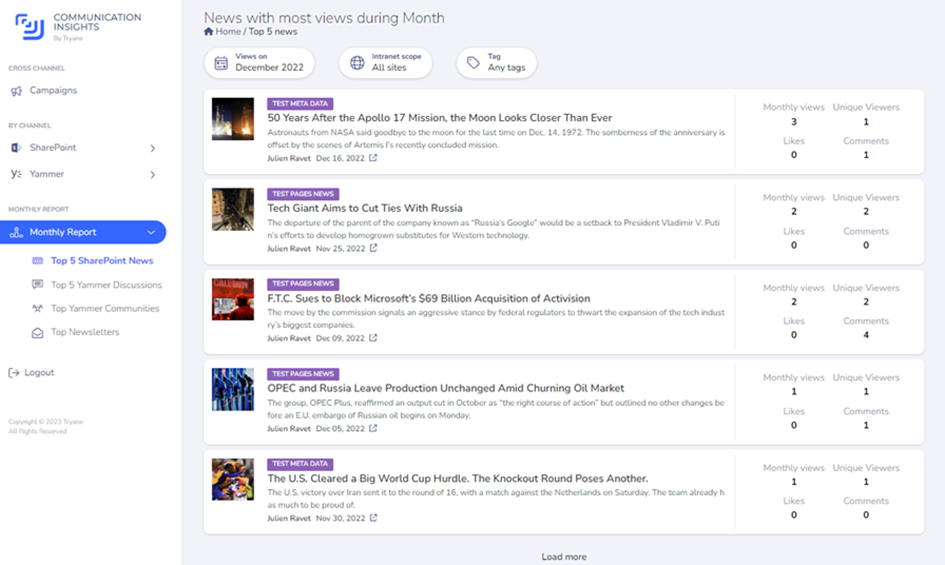
Communication Insights by Tryane Analytics
Contact us today to learn more about our all-in-one analytics solution for internal communications.
Tryane runs a 15-minute working session with Heads of Internal Communication, walking through your current measurement setup and showing where the segmentation gaps sit on your own Microsoft 365 tenant. Book a slot with Jérémy.