
In short
Native Microsoft 365 tools tell you how many views a post received, but not if the right people read it. Discover how to consolidate your metrics across the Viva suite, segment audience reach, and build executive-ready dashboards that prove the true ROI of your campaigns.
Key takeaways
- IC professionals often juggle up to 25 tools to measure strategies; consolidating these into a single dashboard breaks down data silos.
- Tracking cross-channel reach by department reveals whether your message actually landed with the intended audience.
- High engagement drives retention; highly engaged employees are up to 12 times less likely to leave their organisation.
- Two-way platforms like Viva Engage foster trust, allowing single leadership posts to generate thousands of direct employee reactions.
- Longitudinal tracking that persists across tenant changes is critical for maintaining accurate year-over-year communication benchmarks.
The Microsoft Viva measurement challenge
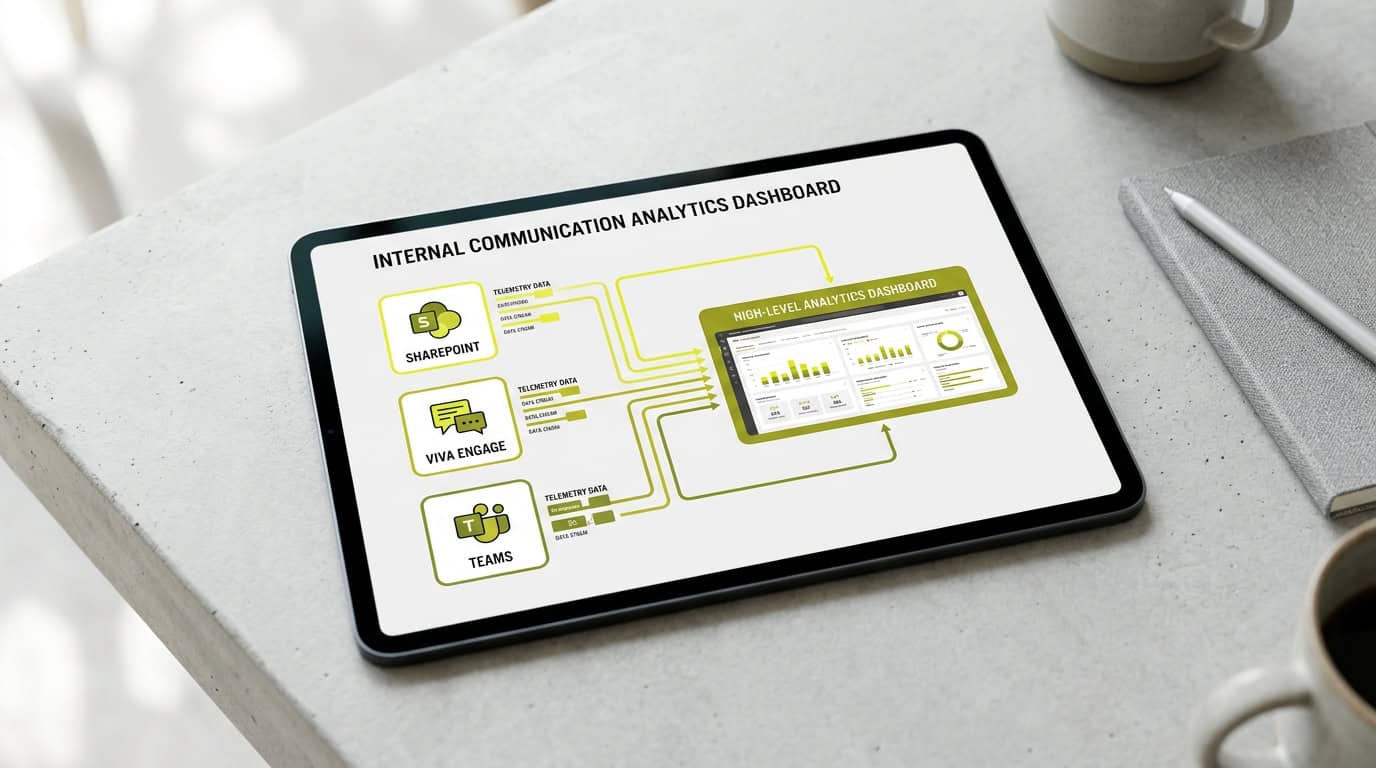
Every Head of Internal Communication managing an enterprise Microsoft 365 environment faces a familiar structural dilemma. Communication leaders publish announcements across multiple digital channels, but evaluating their overall reach remains complicated. When corporate messages are distributed across SharePoint news posts, Microsoft Teams channels, and Viva Engage communities, understanding whether the workforce absorbs critical updates requires sifting through disconnected reporting interfaces.
Overcoming tool sprawl and isolated metrics
Internal communications teams now publish through a wide mix of channels, from email and the intranet to chat, video, and events. As communicators manage this multi-channel ecosystem, native metrics remain trapped within individual applications. SharePoint records site visits, Teams displays channel activity, and email tools monitor open rates. Operating without a unified view forces teams into endless manual reporting while failing to reveal whether key messages resonated across the business.
- Fragmented reporting: Channel metrics exist in native silos without unified aggregation.
- Vanity metric reliance: High view counts obscure actual employee understanding and engagement.
- Manual overhead: Communicators spend hours copying data into spreadsheets instead of analysing trends.
Moving beyond basic activity counting requires establishing a cohesive measurement strategy that evaluates communication performance across every employee touchpoint.
The limits of native Microsoft 365 analytics
Standard Microsoft 365 out-of-the-box dashboards provide essential technical usage statistics, but they fall short for internal communication directors who must evaluate audience engagement. Built-in SharePoint site analytics and Viva Engage native reports capture high-level activity, such as total page views or community visits. However, these figures answer only how many times an asset loaded, leaving communicators unable to confirm whether specific departments or roles actually read the news.
The missing context in standard dashboards
Recent industry research indicates that 92% of internal communications leaders admit they struggle to prove the ROI of their work[1]. A major cause is that standard reporting dashboards provide raw action counts rather than context. When executive leadership asks whether a strategic restructuring update reached frontline personnel or regional operational units, raw page view totals offer no answer.
| Metric Category | Native Dashboard Scope | Strategic Insight Needed |
|---|---|---|
| SharePoint Page Activity | Aggregated total views and unique visitors | Segmented reach by department, country, and role |
| Viva Engage Interaction | Community post counts, likes, and replies | Cross-community sentiment and leadership reach |
| Cross-Channel Performance | Isolated per-tool activity reporting | Deduplicated audience reach across all M365 channels |
Without cross-channel clarity, comms leaders cannot determine if low engagement in one channel is offset by active readership in another.
Connecting data for a holistic digital workplace view
Establishing strategic clarity across your digital workplace requires consolidating data streams into a centralised analytics layer. Rather than treating SharePoint intranet pages, Viva Connections feeds, and Viva Engage feeds as independent channels, internal communication leaders need a suite-level hub that aggregates employee interactions into unified dashboards.
Eliminating data silos and manual reporting
We at Tryane designed Communication Insights to bridge these reporting gaps by unifying cross-channel metrics into an executive-ready view. By removing the burden of manual Excel consolidation, internal comms teams shift their focus from administrative data entry to strategic channel optimisation cross-channel measurement.
A centralised data hub allows comms teams to evaluate channel efficiency, identify communication bottlenecks, and optimise content distribution across the entire employee population.
Moving from simple views to audience segmentation
Raw impression numbers provide little strategic value when assessing organisational alignment. True communication effectiveness hinges on audience segmentation, ensuring that critical announcements reach their intended target groups across different departments, operational roles, and geographic regions.
Segmenting engagement across frontline and desk workers
Specialized solutions like Analytics for SharePoint allow comms directors to filter engagement data by organisational attributes imported from Microsoft Entra ID. This granularity is vital when evaluating communication campaigns targeted at deskless frontline workers versus office-based teams, where access habits and reading behaviours differ significantly.
- Identify low-reach demographics: Detect specific departments or regions with sub-par readership.
- Deduplicate audience counts: Measure unique headcount reached across multiple touchpoints.
- Refine publishing schedules: Optimise posting times based on departmental activity patterns.
Audience segmentation turns broad activity metrics into actionable intelligence, enabling communicators to tailor content formats and delivery methods for under-engaged employee segments.
Proving internal communication ROI to the C-suite
During annual budget reviews, internal communication directors must defend their operational spend with concrete evidence. Moving away from tactical execution summaries toward strategic narratives requires linking internal comms metrics directly to core organisational priorities, such as talent retention, organisational trust, and operational efficiency.
Translating engagement rates into business value
Industry analysis shows that highly engaged employees are 12 times less likely to leave their company than disengaged peers[2]. Presenting an annual internal report to executive leadership that connects verified campaign reach to employee retention metrics establishes internal communications as a revenue-protecting driver.
| Executive Priority | Internal Comms Metric | Business Impact |
|---|---|---|
| Employee Retention | Cross-channel engagement rates among core teams | 21% less turnover in top-quartile engagement teams versus bottom quartile, in high-turnover organisations |
| Strategic Alignment | Executive post read rates across business units | Only 28% of executives and middle managers responsible for executing strategy could list three of their company’s strategic priorities, across 124 organisations studied |
| Operational Efficiency | Intranet page consumption and search activity | 18% higher productivity in sales teams and 14% in production environments for top-quartile engagement teams |
When communicators demonstrate how targeted messaging strengthens employee alignment, securing C-suite buy-in and budget approval becomes a data-grounded process.
Fostering two-way dialogue with Viva Engage
Corporate communications has evolved from one-way broadcasts into ongoing organisational dialogue. Microsoft Viva Engage serves as the primary social environment within Microsoft 365, enabling leadership to interact directly with employees, gather real-time feedback, and foster community culture.
Evaluating enterprise social network performance
Deploying Analytics for Viva Engage allows internal comms teams to monitor community activity, identify key discussion champions, and measure leadership post resonance. Research published by Microsoft indicates that organisations with high Viva Engage adoption achieve employee retention rates 16 percentage points higher than non-active organisations.
- Track executive engagement: Benchmark reaction and reply rates on leadership posts.
- Monitor community health: Identify thriving peer groups versus inactive conversation channels.
- Analyse conversation sentiment: Capture employee feedback trends following major announcements.
Measuring two-way dialogue ensures leadership communication remains authentic, interactive, and responsive to employee concerns.
Tracking longitudinal data to optimise strategy
Evaluating the long-term impact of internal communication initiatives requires historical continuity. Short-term performance snapshots cannot reveal whether engagement trends reflect real cultural shifts or temporary spikes. Longitudinal tracking enables internal comms leaders to benchmark year-over-year performance, adjust strategic messaging, and maintain historical context across organisational restructurings or Microsoft tenant updates.
Driving continuous strategy refinement
Maintaining persistent historical data ensures your measurement framework remains robust regardless of backend infrastructure updates or enterprise migrations. Armed with multi-year engagement trends, IC leaders can confidently make data-driven decisions that continually improve digital workplace communication.
- Establish performance baselines: Define internal standard benchmarks based on historical engagement patterns.
- Evaluate campaign evolution: Compare year-over-year adoption figures across major corporate change initiatives.
- Maintain data integrity: Preserve historical reporting records during Microsoft 365 tenant migrations.
Tryane runs a 15-minute working session with Heads of Internal Communication where we walk through your current measurement setup, identify segmentation gaps, and show what cross-channel reporting looks like on your actual Microsoft 365 tenant. Book a slot with Jérémy to schedule your session.
Frequently asked questions
Can you measure internal communications using only native Microsoft Viva analytics?
While native tools like SharePoint site analytics and Viva Engage dashboards provide basic metrics such as page views and open rates, they do not offer cross-channel audience segmentation. To understand if the right message reached the right people, a dedicated all-in-one analytics platform is required.
How do you calculate the ROI of internal communications in Microsoft 365?
Calculating ROI requires moving beyond simple view counts to analyse engagement rates and behavioural outcomes. By segmenting data by department and tracking how campaigns influence employee retention, where engaged staff are 12 times less likely to leave, you can present concrete business value to the C-suite.
Why is longitudinal tracking important for Viva Engage metrics?
Standard native reports often limit historical data, making year-over-year comparisons difficult. Longitudinal tracking persists through tenant changes and platform migrations, ensuring you retain your historical benchmarks and can accurately measure long-term internal communication trends.
Can Tryane replace SharePoint native analytics?
No. Tryane sits on top. SharePoint continues to record what it records; Tryane consumes its data plus its own tracking layer to give you cross-channel views the native dashboards cannot produce. You keep your existing Microsoft 365 investment and gain the measurement layer for what native cannot do.
How can internal communicators reduce the number of tools they use for metrics?
Internal audits show teams can use up to 25 different tools to strategize and measure campaigns. By implementing a centralised analytics platform like Communication Insights, you can aggregate data from SharePoint, Teams, and Viva Engage into a single, executive-ready dashboard, breaking down data silos.
Sources
Further reading
• Measuring cross-channel internal communications
• Audience segmentation for internal communications
• The five internal communication KPIs that show your IC is working
• Measuring frontline worker communications
• How to prove internal communications works to leadership
• Building an internal communications measurement strategy
Tryane runs a 15-minute working session with Heads of Internal Communication, walking through your current measurement setup and showing where the segmentation gaps sit on your own Microsoft 365 tenant. Book a slot with Jérémy.