
In short
Viva Insights turns Microsoft 365 collaboration data into privacy-protected insights about how people work. For internal comms, it answers work-pattern questions, not reach: its only signal, the Outlook open rate, is per sender, approximate and bounded by privacy thresholds.
Key takeaways
- Microsoft states Viva Insights is not designed for employee evaluation, tracking, profiling or monitoring, and processes personal data in each employee's Exchange Online mailbox.
- Quiet time, focus sessions and Reflect need only an active Exchange Online account, with no Viva Insights service plan.
- Advanced analysis and the Copilot Dashboard require at least 50 assigned Viva Insights licences, combinable with Copilot licences.
- The Outlook add-in reports open rates only for email sent to five or more internal recipients within 14 days, never from shared mailboxes.
- For 5 to 10 recipients the open rate is bounded: below the minimum it displays as <25% and above the maximum as >75%, with no individual recipient visible.
What is Microsoft Viva Insights?
Microsoft Viva Insights is the module of Microsoft Viva that turns your organisation's Microsoft 365 collaboration data into privacy-protected insights about how people work. It analyses signals such as email and calendar activity from Exchange Online and chat and call activity from Microsoft Teams, then converts that activity into recommendations about productivity and wellbeing. Microsoft describes its purpose plainly: data-driven, privacy-protected insights that help people and businesses thrive, with recommendations to improve productivity and wellbeing.[1]
Viva Insights reaches you through two different sets of features and experiences, and knowing which one you are looking at matters when you evaluate what it can do for your communication measurement:[1]
- The Viva Insights web app: the standalone experience with more robust analysis tools and custom reports, including the Microsoft Copilot Dashboard, Copilot Analytics reports and advanced analysis tools for analysts.[1]
- The Viva Insights app in Teams: the experience your employees see daily, with personal insights for individuals and team insights for managers.[1]
- The Viva Insights Outlook add-in: the surface inside Outlook that delivers inline suggestions and, relevant for you, the only open-rate reporting Viva Insights offers.[2]
Notice what the recommendations are about: protecting time in the day for regular breaks, scheduling time for focused work and learning. That is work-habit guidance, not content measurement. If you have read our guide on how to measure internal communications in Microsoft Viva, you already know the distinction: Viva Insights answers how your organisation works, while the question you bring to it, whether employees actually read the news you publish, sits on the communication-analytics side of that line. We come back to that distinction at the end of this article, because it determines what you can honestly report to your leadership.[1]
Before you quote a single number from Viva Insights in a steering meeting, understand the privacy design behind it, because your works council, your DPO and your leadership will ask. Microsoft states the design principles explicitly, and they shape what the tool can and cannot show you:[1]
- Viva Insights is not designed to enable employee evaluation, tracking, automated decision making, profiling, or monitoring.[1]
- Viva Insights data is processed and stored in the employee's Exchange Online mailbox, and it supports General Data Protection Regulation (GDPR) compliance.[1]
- Differential privacy ensures individuals can never be identified from the metrics presented to managers and leaders, and built-in safeguards such as de-identification and aggregation protect individual privacy.[3]
- Individuals choose the insights and experiences they want to receive, and Viva Insights can be configured so that people must purposefully opt in; admins may also disable access at an individual or organisational level.[3]
For you as an internal communication manager, this design has a practical consequence. When a manager or leader opens a Viva Insights report, they see aggregated team and organisation patterns, never the collaboration habits of a named colleague. Microsoft states this directly: managers cannot use Viva Insights to discern anything about a specific individual because of the differential privacy it applies.[3] That is the right design for work-pattern data about people. Keep it in mind, though, because the same aggregation-first philosophy is also why the tool's one communication signal, which we cover in a moment, is deliberately approximate.
Who sees what: employees, managers, leaders, analysts
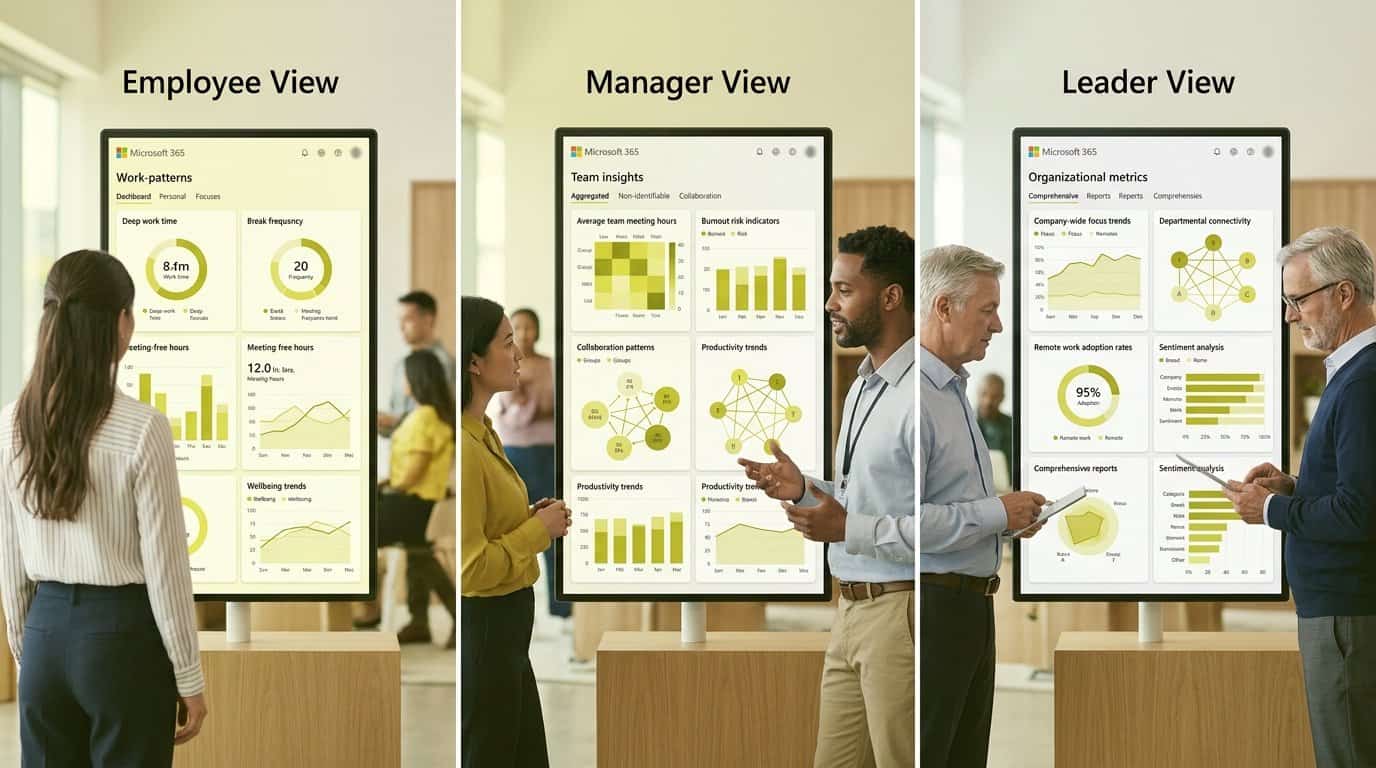
Viva Insights is not one dashboard for everyone. It serves four distinct audiences, each with its own view, and as the person who will be asked what the tool does, you should be able to map every feature to the audience that sees it:[1]
| Audience | Where they see it | What they get |
|---|---|---|
| Employees | Viva Insights app in Teams, Viva Insights Outlook add-in | Personal insights: private, personalised feedback on their own work patterns, wellbeing and productivity, such as protecting time for breaks and focused work.[1] |
| Managers | Viva Insights app in Teams | Team insights: visibility into work habits that might lead to burnout and stress, such as regular after-hours work, meeting overload or too little focus time.[1] |
| Leaders | Viva Insights web app | Organisation insights, the Microsoft Copilot Dashboard and Copilot Analytics reports covering readiness, adoption, impact and sentiment for Copilot and AI transformation.[1] |
| Analysts | Viva Insights web app | Advanced analysis tools to address critical questions about AI transformation, organisational resiliency and work culture, with custom queries and reports.[1] |
| Administrators | Admin settings | The Insights Administrator role controls administrator features only, such as organisational data and privacy settings; the Insights Analyst role has full access to advanced analysis and web app features.[1] |
One change is worth flagging if you last looked at Viva Insights a while ago: organisational behavior insights reports in the Teams app are no longer available. Analysts now publish collaboration insights through the Publish reports feature in the web app, which brings collaboration metrics and Copilot insights together in one place.[1] Business leaders and managers with delegate access can open the Copilot Dashboard and Copilot Analytics reports, but not the advanced analysis or administrator tools.[1]
What you will not find in any of these views, at any role level, is a report on your newsletter, your news posts or your Viva Engage communities. The role model decides who sees work-pattern data. It does not create communication measurement where none exists.
Which Viva Insights features need a paid licence?
Licensing is where most internal communication teams get confused, because Viva Insights mixes free features, an optional subscription and Copilot-included entitlements. Here is the map, without prices, so you know what your tenant already has and what you would need to buy:[2]
| What you want | What it requires |
|---|---|
| Quiet time, booking a non-recurring focus session, Reflect | An active Exchange Online account. No Viva Insights service plan needed.[2] |
| The full personal insights experience, including the Viva Insights Outlook add-in and inline suggestions | A Viva Insights subscription, available for purchase with plans such as Microsoft 365 E3, A3, E5, A5, Business Basic, Business Standard or Business Premium, Office 365 E1, E3, A3, E5 or A5, and Exchange Online Plan 1 or 2.[2] |
| Personal, manager, leader and advanced analysis for Copilot-licensed staff | A Microsoft Copilot plan, which includes a Viva Insights service plan with all of these for every employee with an assigned Copilot licence.[2] |
| Advanced analysis and the Microsoft Copilot Dashboard | At least 50 assigned Viva Insights licences, which can be a combination, for example 30 Copilot licences plus 20 Viva Insights licences.[2] |
Two practical notes. First, Exchange Online is a prerequisite for Viva Insights overall, and shared mailboxes are not supported, which matters for anything your team sends from a shared sender. Second, all users in your organisation are opted in by default whether or not they hold a licence with a Viva Insights subscription, and you can set licensed users to opted out by default if your privacy framework requires it.[2] If your organisation runs Microsoft 365 Germany or the 21Vianet environment, Viva Insights is not supported there at all.[2]
Can Viva Insights track internal email opens?
This is the question that brings most communication managers to Viva Insights, and the answer is: partially, under strict conditions. The Viva Insights Outlook add-in reports open rates for what Microsoft calls qualifying messages, and the definition matters because most of what your team sends will not qualify:[4]
- A qualifying message is an email sent to five or more qualifying recipients, where a qualifying recipient is a person in the same company as the sender with a cloud mailbox. Distribution lists are expanded before recipients are counted.[4]
- Nothing is reported for email sent from a shared mailbox, email sent more than 14 days ago, email with fewer than five total recipients across To, Cc and Bcc, or email sent to modern groups.
- The reported figure is bounded to protect privacy. For 5 to 10 recipients, an open rate below the minimum threshold displays as <25% and one above the maximum displays as >75%; for 11 to 20 recipients the bounds are 10% and 90%, and for more than 20 recipients they are 5% and 95%.[4]
| Number of recipients | Open rate reported |
|---|---|
| 5 – 10 | Minimum 25%, maximum 75%[4] |
| 11 – 20 | Minimum 10%, maximum 90%[4] |
| More than 20 | Minimum 5%, maximum 95%[4] |
Two limits follow directly from this design. The add-in never shows information about individual recipients, and the open rate is visible only to the sender of the message. So if your newsletter goes out from a shared mailbox, you get no figure at all, and if it goes out from a colleague's own mailbox, that colleague alone sees one bounded number. For a communication function that needs to report reach by audience, campaign over time, or channel against channel, this is a personal productivity signal, not a measurement system.[4]
What Viva Insights cannot tell internal comms
By now the pattern should be clear, and it is worth stating as a design choice rather than a defect: Viva Insights is built to answer how the organisation works, not whether your communication reached the people it was meant for. Native analytics across Microsoft 365 share the same trait: they tell you how many views you got, but not whether the message landed in the specific parts of the organisation you targeted. For your actual questions, the gaps look like this:
If you need the intranet side of this picture, we cover what Viva Connections analytics can and cannot show in its own article. The point to hold onto is this: none of these gaps make Viva Insights a bad tool. They make it the wrong instrument for the question your CFO actually asks, which is whether the right people read the right message, in the right channel, at the right moment.
You do not need to abandon Viva Insights to close this gap; you need a measurement layer built for the question it does not answer. That is exactly why we built Communication Insights: an all-in-one, cross-channel analytics platform that connects your email newsletters, your SharePoint intranet, Viva Connections and Viva Engage into one central dashboard, so you can see reach and engagement by the audience segments that matter to you, such as department, country and role, and stop stitching numbers together from isolated tools.
In practice that means one place where you can identify the content that engages, understand which audiences read your posts, and make data-driven decisions about where to publish next, instead of defending your budget with view counts and a bounded open rate from a colleague's Outlook. If you want to see, on your own channels, the reach Viva Insights leaves out, book a call with Hatim on Calendly: in 30 minutes we walk through your current measurement setup and show you what cross-channel reporting looks like on your actual Microsoft 365 tenant.
Frequently asked questions
Is Viva Insights free with Microsoft 365?
Partly. Quiet time, non-recurring focus sessions and Reflect need only an active Exchange Online account. Manager, leader and advanced analysis require a Viva Insights subscription, which can be purchased with plans such as Microsoft 365 E3 or E5, or they come included for employees holding a Microsoft Copilot licence.
Can my manager see my personal insights in Viva Insights?
No. Personal insights are private to you, and manager insights are protected by differential privacy, which Microsoft says makes it impossible to discern the individual activities of any specific person on the team. Managers see aggregate team patterns such as after-hours work and meeting overload, not individual data.
Can Viva Insights tell me who opened my internal email?
No. The Viva Insights Outlook add-in never shows information about individual recipients and reports approximated values only, to protect privacy. Only the sender sees an open rate for qualifying messages. To see who opened an email, Microsoft points to Outlook's request read receipts instead.
Why does my email open rate display as less than 25%?
Viva Insights bounds open rates by recipient count to protect privacy. For 5 to 10 recipients, rates below the minimum display as <25% and rates above the maximum display as >75%; only values between the thresholds show the actual rate. For 11 to 20 recipients the bounds are 10% and 90%, and above 20 recipients, 5% and 95%.
How many licences do we need for advanced analysis in Viva Insights?
At least 50 assigned Viva Insights licences are required to access advanced analysis and the Microsoft Copilot Dashboard. The threshold can be met by combining licence types, for example 30 Microsoft Copilot licences plus 20 Viva Insights licences.
Does Viva Insights work with shared mailboxes?
No. Shared mailboxes are not supported, and email sent from a shared mailbox is excluded from the open-rate reporting in the Viva Insights Outlook add-in. Email sent to modern groups is also not reported unless users follow the group.
Can I use Viva Insights to measure internal communication reach?
Only partially. Viva Insights measures work patterns and wellbeing, not content consumption. Its one reach signal, the Outlook open rate, applies per sender, only to qualifying internal email within 14 days, and is bounded by privacy thresholds. It does not show reach of SharePoint news, Viva Engage posts or newsletters by audience segment.
Sources
Further reading
• The annual internal communications report: a template for the C-suite
• Viva Insights vs communication analytics: two different questions
• How to measure internal communications in Microsoft Viva
• Viva Connections Analytics: How to Measure Intranet Adoption in Microsoft 365
If you want to see what cross-channel reporting looks like against your real data, Tryane runs a 15-minute walkthrough with no slides. Book a slot with Jérémy.